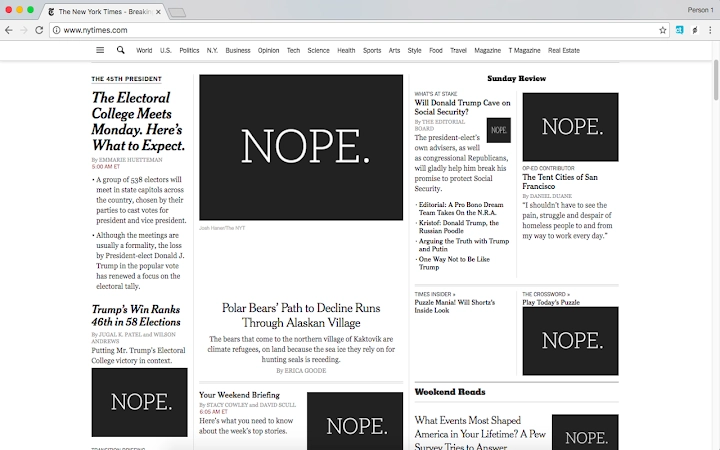

Block Images Instantly with NOPE.
Overview
Hide images with NOPE. is a desktop browser extension designed to help users suppress visual content on web pages. Its primary purpose is to allow readers to access textual information without the distraction of images, catering to those who prefer a text-only browsing experience. The software addresses common user concerns such as visual fatigue, unwanted exposure to sensitive or offensive imagery, and the desire for focused reading. It is particularly useful for individuals seeking to avoid celebrity photos, political figures, or disturbing visuals while researching or consuming online content.
Target users include privacy-conscious individuals, content researchers, and those with sensory sensitivities. The tool supports both Windows and Mac operating systems, making it accessible to a broad audience. It operates as a browser-based utility, integrating directly into the user’s web environment. The extension is free to use, with no subscription or hidden fees. It does not block advertisements or videos, as noted in the developer’s description, ensuring that core functionality remains focused on image suppression.
Real-world usage scenarios include reading news articles without celebrity images, researching exterminator services without pest-related visuals, or consuming political content without the presence of specific public figures. The extension’s simplicity and immediate effect make it suitable for both casual users and professionals seeking a distraction-free experience. The developer did not provide additional details about the development background or organizational structure.
Key Features & Capabilities
- One-Click Image Hiding – Users can toggle image visibility with a single click on the extension icon, offering immediate control over visual content.
- Text-First Browsing – Designed to prioritize textual content by suppressing images, ideal for users who value information over visuals.
- Toggle Functionality – The ability to switch between “Hide” and “Show” modes allows users to customize their browsing experience dynamically.
- Non-Intrusive Design – The extension operates without altering page structure or functionality, maintaining the integrity of the original content.
- Privacy-Focused Workflow – By removing images, it reduces exposure to potentially intrusive or unwanted visual stimuli, supporting user autonomy.
Each feature serves a practical purpose. For example, a user researching pest control methods can hide images of insects to avoid discomfort, while someone reading political commentary can avoid seeing specific figures they wish to exclude. The toggle system enables users to restore visuals when needed, ensuring flexibility.
The extension does not interfere with page loading or navigation, preserving the browsing experience. It is optimized for use with standard web content and is compatible with major browsers on Windows and Mac. The developer did not specify additional customization options or advanced filtering rules.
User Interface, Workflow & Performance
The user interface of Hide images with NOPE. is minimal and focused on functionality. The extension icon appears in the browser toolbar, providing quick access to the hide/show toggle. Navigation is straightforward: clicking the icon activates the feature, and a simple selection between “Hide” and “Show” adjusts the display. The workflow is intuitive, requiring no setup or configuration, making it accessible to users of all technical levels.
Performance is not detailed in the provided information. However, based on the extension’s lightweight nature and small file size of 2.4 MB, it is likely to have minimal impact on system resources. The developer did not specify CPU or RAM usage.
General software behavior patterns suggest that such extensions typically run efficiently in the background without noticeable lag. Stability is expected to be consistent, as the tool performs a single, focused task without complex processing. Users may need to wait for a page to fully load or refresh the page before the extension takes effect, as noted in the description.
There are no reported issues with crashes or compatibility disruptions. The extension does not modify page content beyond image visibility, reducing the risk of conflicts. No performance benchmarks or user feedback were provided, so real-world behavior remains unverified. The developer did not include information about update frequency or error handling mechanisms.
Compatibility & System Requirements
Hide images with NOPE. is compatible with Windows and Mac operating systems, supporting both platforms for desktop use. The software version is 1.0.2, and the installation size is 2.4 MB, indicating a lightweight footprint. It functions as a browser extension, meaning it requires a compatible web browser to operate.
Exact system requirements were not listed. The developer did not provide information on minimum CPU, RAM, or disk space specifications. Compatibility with specific browser versions was not detailed.
Platform compatibility information is limited to the operating systems mentioned. Users are advised to ensure their browser supports extensions and that they have the latest updates installed for optimal performance. The extension may not function correctly on older or unsupported browsers.
Pros and Cons
Pros
- Simple, one-click interface for immediate image hiding
- Free to use with no hidden costs
- Lightweight at only 2.4 MB
- Supports both Windows and Mac
- Allows users to toggle between hidden and visible images
Cons
- Does not block advertising images or videos
- May require page refresh to take effect
- No advanced filtering or customization options available
- Limited system requirement details
- Functionality is limited to image suppression only
FAQ Section
Is Hide images with NOPE. available for all browsers?
The extension is designed for desktop browsers on Windows and Mac, but specific browser compatibility was not detailed in the provided information.
Does the extension block ads or videos?
No. According to the developer, the extension does not block advertising images or videos.
Can I use this tool offline?
Yes, once installed, the extension functions without an internet connection, as it operates directly within the browser environment.
How often does the extension update?
Update frequency was not specified by the developer.
Is the software safe to install?
As a browser extension with a small file size and no reported security issues, it is considered safe for use. However, users should install from official sources to ensure authenticity.
Final Thoughts + CTA
Hide images with NOPE. delivers a focused, no-frills solution for users who want to eliminate images from their browsing experience. Its simplicity, lightweight design, and free access make it a compelling choice for anyone seeking a distraction-free reading environment. While it lacks advanced features like custom filters or ad blocking, its core functionality is reliable and effective for its intended purpose.
It is especially beneficial for users with sensory sensitivities, privacy concerns, or those who simply prefer to read without visual distractions. The ability to toggle images on and off adds flexibility, ensuring users maintain control over their online experience. Despite limited system details and no advanced customization, the tool fulfills its promise with minimal overhead.
For those looking to enhance their web reading experience by removing unwanted visuals, this extension offers a practical and accessible solution. Download Hide images with NOPE. now.







